Showing posts with label social media. Show all posts

Saturday

How to Reclaim Your Privacy on Facebook

Facebook is a great tool for RVers and really all of us who want to connect with friends and share our experiences, travels, photos and life stories.  But lately the topic of privacy, or the lack of it, on facebook and other social media sites has caused quite a stir.  I decided to post this information since I see several posts a day that suggest an incorrect way to keep your privacy on Facebook  You probably seen it too.  Many of our Hidden Valley Facebook fans have even asked about it.  The Facebook post goes something like this:
Hello to all of you who are on my list of contacts of Facebook. I would like to ask a favor of you…. You may not know that Facebook has changed its privacy configuration once again. Thanks to the new “Graphic app”, any person on FB anywhere in the world can see our photos, our “likes” and our “comments”. During the next two weeks, I am going to keep this message posted and I ask you to do the following and comment “DONE”. Those of my friends who do not maintain my information in private will be eliminated from my list of friends, because I want the information I share with you, my friends, to remain among my friends and not be available to the whole world. I want to be able to publish photos of my friends and family without strangers being able to see them, which is what happens now when you choose “like” or “comment”. Unfortunately we cannot change this configuration because FB has made it like this.
1. So, please, place your cursor over my photo that appears in this box (without clicking) and a window will open.
2. Now move the cursor to the word “Friends”, again without clicking and then click on “Settings”.
3. Un-check “Life Events” and “Comments and Like”. This way my activity with my family and friends will no longer be made public.
4. Now, copy and paste this text on your own wall (do not “share” it!). Once I see it published on your page, I will un-check the same.
The ONLY true part of this whole post is that FB DOES have a fairly new function called "graph search." You may be familiar with the site called Snopes that examines many commonly reported stories and after research, reports if they are truth or myth.  They have also affirmed that this story about facebook is not true.  You can read their research here.

"Graph search" does NOT make your likes, comments or photos be seen by people all over the world.  Your photos can only be seen by those you chose.  For many, fixing these privacy settings is 2nd nature but for the rest of us, this is an easy, step by step "how to" to set your privacy the way YOU want it on Facebook.  Note: click on any of the screen shot photos below to see a larger version.

Status Updates or Posts

Screen Print of a Status Posting Box
Status or posting box

Note in the box above there arrow pointing out the drop down arrow.  This same drop down arrow appears on the photo screen (note below.)

Photo Posts

how to choose who sees your posts

 When you click on either the posting or photo screen on this drop down arrow you see the option box shown above.  By default it is set on public.  You may change it so that your post or photo is seem only by your "friends," by only yourself or if you click "custom" you can put specific friends in the box.  In this way you are limiting all your posts to your desired setting.  This setting can be changed for each status update or photo you post. 

However, if you direct people to un-click the options when they hover their cursor over "friends" on your profile picture, your photos and posts will not be seen by them.  In effect, they are telling facebook they don't want to see any of the options that are unchecked.

Privacy Settings

There is one way that unwanted persons can see photos of you.  If a friend posts a photos of you and has it set to "public," or if someone "tags" you in a photo that you posted just to friends.  There are a few ways to prevent this most of the time.  On the top right on your facebook page there is a little gear symbol.  (see below.)
How to access and change your privacy settings
Access privacy settings here
Once you click on the gear you can change your privacy settings, who is allowed to post on your timeline, if you will allow others to tag you in photos, etc.  You can even block individuals who show up on your newsfeed whose posts you find offensive for one reason or another.  Even if someone is not your friend you may still see their posts if they are a friend of a friend.  Sometimes you may want to block one of these.  Remember you can also "un-friend" someone at any time.  They are NOT notified that you have done so.  They may notice it if they look at your timeline or hover over your name and see "Add Friend" instead of friend.  Play around with these settings and see which fit you best.  

I'm not a professional facebook guru but since I'm interested in keeping what I want private...private, while sharing the rest with the world - I try to keep abreast of all the changes and myths that circulate about facebook and other social media sites.  If you have any questions that I didn't address on this topic or something still doesn't seem clear I welcome your questions in the comments below.  I will reply with an answer and edit this article to explain it more clearly.  See you on Facebook!

Teri Blaschke is the RV Park operator of family owned HiddenValley RV Park in San Antonio, TX and writer of the park blog “A Little Piece of Country in San Antonio.” Teri contributes to various other blogs with a focus on either travel or social media and how it relates to the outdoor hospitality industry but her passion is serving the RV travel community by providing a memorable RV camping experience and growing the Hidden Valley RV family.  Connect with , Facebook, Pinterest and Twitter@HiddenValleyRV and our RV Country Daily Magazine and don't forget to Say hello to the voice of Hidden Valley 


Thursday

"Where Are Your Facebook Posts?"

     One of our facebook page fans recently posted this question on our Pinterest Question Box, Ask Us, Tell Us: 
She lamented "I LIKED your Hidden Valley facebook page but very seldom see your posts.  If I go to your timeline I see that you post all the time.  How can I get your updates on MY page?

     Well, many thanks for checking our timeline, Cindy.   As all of us know, Facebook changes as often as we change socks but right now there is a way to see our updates and those of all your friends and favorite pages in your own newsfeed and even get notifications when we make a new post.  Here's why you don't see them and how to get them:           

Friday

Pinterest in 8 Steps, A "Natural" for RVers

The fastest growing social sharing site, Pinterest, is, to say the least, a little addicting. If you've spent the few minutes it takes to open a free account at pinterest.com, you've undoubtedly already seen that it's an RVers friend, with thousands of "picture" ideas to simplify, organize and enhance the RV experience.

Since I've noticed that many of our guests haven't yet made the leap into Pinterest...
"it's too much like Facebook" (not even close,)
"I don't understand it," (I'm gonna show you,) or
"It'll take too much of my time," (you've got me there-I've got to really watch myself or hours could go by.)
I thought some may like a short "how to" on what it's all about.

What it is

Imagine a bulletin board...divided into sections.  Each section has a different theme, each one, a favorite of yours.  Maybe it's Crafts, DIY stuff, Recipes, the RV Parks you've most enjoyed, gardening tips, fashion ideas, home decor or what to do and see in your favorite city.  If you really love cooking, you may include sections - Pinterest calls them boards - on specific types of food, appetizers, Chinese, desserts, etc.  Wait, let me just show you what I mean.  Here's a screenshot of a part of my Pinterest page and boards.
Hidden Valley RV Parks Pinterest Page
Boards on a Pinterest Page

These are few of my boards.  Each board can have an unlimited number of pins, or pictures.  Here you can only see five of the pins on each board...the large one on the cover and four thumbnail sized ones.  Clicking on your or someone else's board will show you ALL their pins.  For example, if you click on the board on the top right called RV Travel and Tips - this is part what you'll see:

Hidden Valley RV Parks Pinterest Page pins
Individual pins on a Pinterest Board

These photo ideas can be "pinned" from boards of other people whose pages you can scroll through or follow if you'd like.  You may also have a photo of your own you'd like to share that gives instructions on how to BBQ the perfect steak to how to craft your own greeting cards or tips to better organize your RV, as you see some of above.  You may add videos from you Tube or from your computer.  The real fun comes when you find a photo, or pin, that jumps out atcha.  If you want details on how the tip is done, how to make the craft or how to back up an RV safely...just click on the particular pin and Voila, directions and details.  You may comment on any pin once you click on it or click the like or "Pin" button if you want to add it to one of your boards.  We RVers love to share so Pinterest is just a "natural" for us. There's lots of fun details but let's just start simple (is anything on the computer simple?) and see how to get started.

How to get started
How to Join Pinterest1.  Go to pinterest.com
2.  Click on the red button "Join Pinterest."
 
3.  You then have some choices to create the account: Use a facebook or twitter account if you already have one.  Although this can be easier because you don't need a separate password (you can use the same as in facebook or twitter) but personally I prefer the 3rd choice "sign up with your email address."  I feel it's more secure.  Just make your choice by clicking a button or the email option.

4.  Forgot to take a picture but next there is a simple form to fill out if you select the email option, choosing a Username and password and a couple details.  Remember or write down your Username, the email you used and your password.

5.  When you go to the next step, Pinterest will show you a list of topics you may be interested in.  Scroll through then and pick 5 boards from any topics.  It really doesn't matter if you like them or not because you can change, add and delete boards later.  This is just to get you started.  I chose the first five under "gardening" by clicking the "follow button next to them. 

6.  Then you will get a whole board of beautiful photos of the ideas regarding the topics you followed.  At the top of the page it will ask you to verify you email address.  Just open a new browser window and look for an email from Pinterest.  When you find it, click the "red, confirm email button."  You will be automatically brought to the Pinterest page again.
7.  As you scroll over the pins with your mouse, you'll notice that each picture shows a repin, like and comment button.  Fellow pinners like to feel appreciated so comments and likes are always nice.  Now...

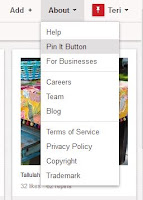
8.  Go to the "About" tab on the top right of the page. Scroll down to "Pin it Button" and click it.  On this page, scroll down till you see the section called "The Pin It Button."  Follow the directions to drag that little red button up to the toolbar on your browser, usually that's right under your address bar.  You may want to read some of the tips on this page on what and how to pin.

Now your ready to pin.

Create boards
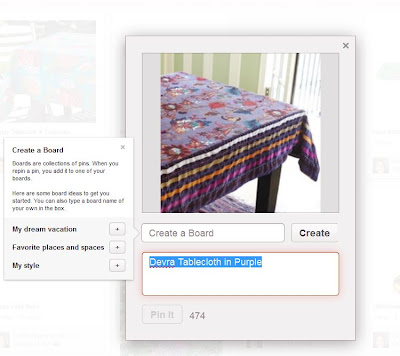
First, go back to your pinterest page.  If you clicked away from it, just go back to pinterest.com.  You may need to use your sign in username and password or you may still be signed on and immediately directed to your page.  You'll be back on the page with the boards you followed,  (all those pretty photos.) Scroll with your mouse over photos that interest you and click the "repin" button.  This is what you'll see.  It's asking us to create a new board name.  I may call this board, "Tablecloths to Sew," "Things I Love," or even "Purple."  Once you create your board, hit create.  Don't stress over the name much because you can edit the names at any time.  You'll notice the blue highlighted text.  That is the description used by the original pinner.  You may use the same text, add to it or change it completely.  Now hit the "Pin it" button on the photo. Tada!  You've done it.

Next, go back to your main page by scrolling over your name on the top right corner then clicking on "boards."  You should see the one board you just created.  
Remember that red pin it button you dragged to the toolbar?  Let's use it.  Go to one of your favorite websites n the internet.  You could even go to Hidden Valley's site. 
Once your on a site (hope you picked one with pictures,) go up to your browser toolbar and click the little Pin It button.  If you went to the Hidden Valley site, after clicking your Pin it button on the toolbar you will see a selection of all the photos on that webpage.  If you scroll over it with your mouse you'll see the words "pin it."  If you click it you''ll see a box similar to the one you pinned first but with a new picture.  If this picture is a new topic or category, click on the little arrow where the original boards title is and you'll again get the option to create a new board.  Pick a board name and "pin It."

Now go play!  Pin a bunch of stuff you love and don't worry if you put it on the wrong board or don't add a good description.  Later on you can go back to those boards and pins and hit the edit key and change the titles, what board you put then on...you can even repin pins onto other boards of yours if they fit into 2 categories.

Look at some other peoples boards and see the kinds of titles they use and how they describe their pins.  This will give you ideas.  Recipe sites are a great place to find great pins.  

Experiment and try to complete your profile bio, add your personal photo, etc. (see Settings under your page name in the drop down box.)
Any questions?  Get stuck somewhere along the way? 

Drop a comment and I'll answer asap.


Teri Blaschke is the RV Park operator of family owned HiddenValley RV Park in San Antonio, TX and writer of the park blog “A Little Piece of Country in San Antonio.” Teri contributes to various other blogs with a focus on either travel or social media and how it relates to the outdoor hospitality industry but her passion is serving the RV travel community by providing a memorable RV camping experience and growing the Hidden Valley RV family.  Connect with , Facebook, Pinterest and Twitter@HiddenValleyRV
Say hello to the voice of Hidden Valley 

Sunday

9+ Things We Will Soon Bid Farewell To


After receiving this email I googled the title phrase "9 Things That Will Disappear in Our Lifetime" and found scores of blogs who had already reprinted this viral email.The original email had cutesy animated pictures and some of the blogs even put their posts to music. 

Some of these disappearing phenomena... checks, land line telephones... no big loss, but books, the luxury of walking over to your music library and playing a DVD, control over our personal property...difficult to imagine the world without.  It got me to thinking about the many things that, in retrospect, are so different today from, say 30 years ago.  They changed ever so gradually almost lulling us into thinking only of the benefits of the new changes not what we would be giving up.

If you've already seen this email, skip to the end to see my personal thoughts and some other disappearing commonalities I've noticed.  Just in case you haven't seen this email, here's it is:

Something to think about.
Whether these changes are good or bad depends in part on how we adapt to them.
But, ready or not, here they come.
1. The Post Office. Get ready to imagine a world without the post office. They are so deeply in financial trouble that there is probably no way to sustain it long term. e-mail, Fed Ex, and UPS have just about wiped out the minimum revenue needed to keep the post office alive. Most of your mail every day is junk mail and bills.
2. The Check. Britain is already laying the groundwork to do away with checks by 2018. It costs the financial system billions of dollars a year to process checks. Plastic cards and online transactions will lead to the eventual demise of the check. This plays right into the death of the post office. If you never paid your bills by mail and never received them by mail, the post office would absolutely go out of business.

3. The Newspaper. The younger generation simply doesn't read the newspaper. They certainly don't subscribe to a daily delivered print edition. That may go the way of the milkman and the laundry man. As for reading the paper online, get ready to pay for it. The rise in mobile Internet devices and e-readers has caused all the newspaper and magazine publishers to form an alliance. They have met with Apple, Amazon, and the major cell phone companies to develop a model for paid subscription services.

The disappearing book

4. The Book. You say you will never give up the physical book that you hold in your hand and turn the literal pages. I said the same thing about downloading music from iTunes. I wanted my hard copy CD. But I quickly changed my mind when I discovered that I could get albums for half the price without ever leaving home to get the latest music. The same thing will happen with books. You can browse a bookstore online and even read a preview chapter before you buy. And the price is less than half that of a real book. And think of the convenience! Once you start flicking your fingers on the screen instead of the book, you find that you are lost in the story, can't wait to see what happens next, and you forget that you're holding a gadget instead of a book.


5. The Land Line Telephone. Unless you have a large family and make a lot of local calls, you don't need it anymore. Most people keep it simply because they've always had it. But you are paying double charges for that extra service. All the cell phone companies will let you call customers using the same cell provider for no charge against your minutes


6. Music. This is one of the saddest parts of the change story. The music industry is dying a slow death. Not just because of illegal downloading. It's the lack of innovative new music being given a chance to get to the people who would like to hear it. Greed and corruption is the problem. The record labels and the radio conglomerates are simply self-destructing. Over 40% of the music purchased today is "catalog items," meaning traditional music that the public is familiar with. Older established artists. This is also true on the live concert circuit. To explore this fascinating and disturbing topic further, check out the book, "Appetite for Self-Destruction" by Steve Knopper, and the video documentary, "Before the Music Dies."


7. Television. Revenues to the networks are down dramatically. Not just because of the economy. People are watching TV and movies streamed from their computers. And they're playing games and doing lots of other things that take up the time that used to be spent watching TV. Prime time shows have degenerated down to lower than the lowest common denominator. Cable rates are skyrocketing and commercials run about every 4 minutes and 30 seconds. I say good riddance to most of it. It's time for the cable companies to be put out of our misery. Let the people choose what they want to watch online and through Netflix.


8. "Things" That You Own. Many of the very possessions that we used to own are still in our lives, but we may not actually own them in the future. They may simply reside in "the cloud." Today your computer has a hard drive and you store your pictures, music, movies, and documents. Your software is on a CD or DVD, and you can always re-install it if need be. But all of that is changing. Apple, Microsoft, and Google are all finishing up their latest "cloud services." That means that when you turn on a computer, the Internet will be built into the operating system. So, Windows, Google, and the Mac OS will be tied straight into the Internet. If you click an icon, it will open something in the Internet cloud. If you save something, it will be saved to the cloud. And you may pay a monthly subscription fee to the cloud provider. In this virtual world, you can access your music or your books, or your whatever from any laptop or handheld device. That's the good news. But, will you actually own any of this "stuff" or will it all be able to disappear at any moment in a big "Poof?" Will most of the things in our lives be disposable and whimsical? It makes you want to run to the closet and pull out that photo album, grab a book from the shelf, or open up a CD case and pull out the insert.

9.
Privacy. If there ever was a concept that we can look back on nostalgically, it would be privacy. That's gone. It's been gone for a long time anyway. There are cameras on the street, in most of the buildings, and even built into your computer and cell phone. But you can be sure that 24/7, "They" know who you are and where you are, right down to the GPS coordinates, and the Google Street View. If you buy something, your habit is put into a zillion profiles, and your ads will change to reflect those habits. And "They" will try to get you to buy something else. Again and again.
All we will have that can't be changed are Memories.
picture of a bank building After reading about these soon to be extinct "dinosaurs" us seasoned humans have come to rely on, I wondered about banks?  There are so many ONLY online banks already and most banks do much business online so why the building?  ATM machines provide any cash (what's that) anyone may need.  I honestly have not used cash personally for so long it amazes me when I hear of someone going to cash their paycheck.  Even in the RV Park business I rarely see cash or checks any longer. Credit/debit cards reign at our San Antonio RV Park.
thought about even more eroding familiarities in our lives.  The email talked about checks but what of

One of my favorite crafts is another disappearing trend:  greeting cards.  With the advent of e-cards and now - sending gifts with facebook, I see a greeting card maybe once a year.  Not that I dislike email greetings, God knows I send enough of them, but I still love the idea of making cards and glue sticking charms, felt and antique looking ephemera on scrapbook paper or card stock. And receiving a customized message with a short poem or verse is so much more satisfying and memorable.  I must confess I most often use the computer to assist in making them though.

Now here's one for us RVers.  When's the last time you used a map.  No, not a Delorme CD atlas or mapping software...a 36" X 48" state map folded into 8 1/2 X 3" sections.  I have free maps of Texas here at the park and no one ever takes them.  I do admit to using a local San Antonio and downtown map in the course of giving virtual San Antonio tours. But often while using a map a guest will mention their preference to "just use the GPS."  I really WANT to like those things but even though I've had one for some time, it sits...I don't even know where it sits, but it's not in the car.  Takes me too long to program it.  I don't do much better with the one on my phone. 

Quality time.  Now there's an overused phrase for you.  What does it really mean.  But I'm pretty sure that all this technology that's meant to give us more free quality time is accomplishing exactly the opposite.  I am the worlds worse on spending time on this crazy computer.  Whether it's for business or pleasure, tracking social media accounts or maintaining charts, it has become third to only two other priorities and those probably suffer from time to time also.  When I went on vacation and our accommodations didn't have WiFi I was frantic.  Some stress was over not being able to conduct necessary business but mostly just not being able to check "things."  Things like facebook, email ( all 5 accounts,) twitter, pinterest...oh you know the lot of them I'm sure. 

Library Card Systems-A distant memory replaced by Computers
Books were mentioned and it's undoubtedly just a matter of time when an actual book becomes a rarity libraries?  If they do continue to exist they will be more like computer data centers where literature could be downloaded or temporarily copied from a data cloud then removed from our devices to make room for other data.  Even without a Kindle you can now read the hundreds of pages of the Bible, the novel War and Peace and any number of magazines and periodicals online, mostly for free or a small fee.  Libraries have been using computers to catalog for years so using them to store the literature is no longer a stretch of the imagination. 
but what about


Just a note on privacy, or the lack thereof:  people talk about it and some are genuinely concerned about keeping it but the other side of the spectrum includes those who catalog their every move on facebook, checking in at each restaurant, store, gas station and movie theater they frequent and who they are with; and even more invasive is foursquare where people let you know when they get home, when they arrive at work and when they stop off at their friendly ATM.  This post is probably being recorded and cataloged along side my name.  Ooo...that's a little creepy.  But it's true and it will probably soon end up on that long list I found at the outset when I googled "9 Things That Are Disappearing in Our Lifetime."


Teri Blaschke is the RV Park operator of family owned HiddenValley RV Park in San Antonio, TX and writer of the park blog “A Little Piece of Country in San Antonio.” Teri contributes to various other blogs with a focus on either travel or social media and how it relates to the outdoor hospitality industry but her passion is serving the RV travel community by providing a memorable RV camping experience and growing the Hidden Valley RV family.  Connect with , Facebook, Pinterest and Twitter@HiddenValleyRV


photo credit: jakebouma via photopin cc

Tuesday

How To Make Those Fancy Infographics...Info What?

In talking with our guests I find that some are happy to take a hiatus from their laptop or ipad while traveling in their RV but increasingly I see that many RVers are very involved with social media... facebook, twitter and pinterest... and wouldn't think of missing their routine of checking with friends and family and even business contacts with these tools.  

Something we see see more and more of online is an educational tool called an infographic.  These are graphic visual representations of information, data or knowledge. These graphics present complex information quickly and clearly, using signs, pictures, maps, journalism, technical writing, and education. This may seem unrelated to RVing but they can be very helpful as a marketing tool if you have an internet based business as a means to support or subsidize your full-time RV lifestyle.

    Here's an everyday example of 
  how infographics can be helpful>>>>

You may already be familiar with these but if not, be prepared to see these appear more and more as they flood the more visual sites like Pinterest and Facebook.  

Want to make one?  Don't be intimidated.  If your computer has PowerPoint, you can make one of those fancy infographics with a free tool from HubSpot.  You need to have a company and website to be able to fill out the short form to download this free tool.  If you don't have a company or website and you'd like to try experimenting with infographics, email me and I'll forward you a copy of the tool I downloaded with complete instructions.  Remember, your computer must have the Microsoft Office PowerPoint software.  (Note, this is just one option.  There are other programs and templates to use and some of them have a download fee.)

You'll love this template, which gives you three choices: a step-by-step infographic, an informational infographic or a data-packed infographic.

The example here is pretty involved but yours doesn't have to be this elaborate. Start out small until you get the hang of it. These wildly popular infographics are great for pinning on Pinterest, accompanying a blog post or to send to your friends or family.  Anything you want to teach or explain, crafts, DIY projects, "ways to support your life on the road" or "how to take good photos of birds" lends itself to this new phenomena.

You can also create pie charts, doodles, flow charts, bar charts, maps, word clouds and those fun little sticky notes.  


If you're up for trying this new tool and you put a copy somewhere online, like a blog, website or travel journal, share your experience with us in a the comments and a link to results of your labor.  I, too will be experimenting and will share my work as it progresses.
Happy infographicing!  

Much of this information is reprinted from "The Publicity Hound's Tips of the Week," an ezine featuring tips, tricks and tools for generating free publicity. Subscribe at http://www.publicityhound.com/ and receive by email the handy cheat sheet "89 Reasons to Send a Press Release."


Teri Blaschke is the RV Park operator of family owned HiddenValley RV Park in San Antonio, TX and writer of the park blog “A Little Piece of Country in San Antonio.” Teri contributes to various other blogs with a focus on either travel or social media and how it relates to the outdoor hospitality industry but her passion is serving the RV travel community by providing a memorable RV camping experience and growing the Hidden Valley RV family.  Connect with , Facebook and Twitter@HiddenValleyRV
 
Related Posts Plugin for WordPress, Blogger...