Facebook is a great tool for RVers and really all of us who want to connect with friends and share our experiences, travels, photos and life stories. But lately the topic of privacy, or the lack of it, on facebook and other social media sites has caused quite a stir. I decided to post this information since I see several posts a day that suggest an incorrect way to keep your privacy on Facebook You probably seen it too. Many of our Hidden Valley Facebook fans have even asked about it. The Facebook post goes something like this:
Hello
to all of you who are on my list of contacts of Facebook. I would like
to ask a favor of you…. You may not know that Facebook has changed its
privacy configuration once again. Thanks to the new “Graphic app”, any
person on FB anywhere in the world can see our photos, our “likes” and
our “comments”. During the next two weeks, I am going to keep this
message posted and I ask you to do the following and comment “DONE”.
Those of my friends who do not maintain my information in private will
be eliminated from my list of friends, because I want the information I
share with you, my friends, to remain among my friends and not be
available to the whole world. I want to be able to publish photos of my
friends and family without strangers being able to see them, which is
what happens now when you choose “like” or “comment”. Unfortunately we
cannot change this configuration because FB has made it like this.
1. So, please, place your cursor over my photo that appears in this box (without clicking) and a window will open.
2. Now move the cursor to the word “Friends”, again without clicking and then click on “Settings”.
3. Un-check “Life Events” and “Comments and Like”. This way my
activity with my family and friends will no longer be made public.
4. Now, copy and paste this text on your own wall (do not “share” it!).
Once I see it published on your page, I will un-check the same.
The ONLY true part of this whole post is that FB DOES have a fairly new function called "graph search." You may be familiar with the site called Snopes that examines many commonly reported stories and after research, reports if they are truth or myth. They have also affirmed that this story about facebook is not true.
You can read their research here.
"Graph search" does NOT make your likes, comments or photos be seen by people all over the world. Your photos can
only be seen by those you chose. For many, fixing these privacy settings is 2nd nature but for the rest of us, this is an easy, step by step "how to" to set your privacy the way YOU want it on Facebook. Note: click on any of the screen shot photos below to see a larger version.
Status Updates or Posts
 |
| Status or posting box |
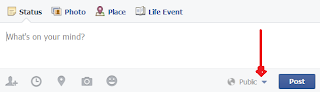
Note in the box above there arrow pointing out the drop down arrow. This same drop down arrow appears on the photo screen (note below.)
Photo Posts
When you click on either the posting or photo screen on this drop down arrow you see the option box shown above. By default it is set on public. You may change it so that your post or photo is seem only by your "friends," by only yourself or if you click "custom" you can put specific friends in the box. In this way you are limiting all your posts to your desired setting. This setting can be changed for each status update or photo you post.
However, if you direct people to un-click the options when they hover their cursor over "friends" on your profile picture, your photos and posts will not be seen by them. In effect, they are telling facebook they don't want to see any of the options that are unchecked.
Privacy Settings
There is one way that unwanted persons can see photos of you. If a
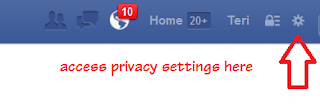
friend posts a photos of you and has it set to "public," or if someone "tags" you in a photo that you posted just to friends. There are a few ways to prevent this most of the time. On the top right on your facebook page there is a little gear symbol. (see below.)
 |
| Access privacy settings here |
Once you click on the gear you can change your privacy settings, who is allowed to post on your timeline, if you will allow others to tag you in photos, etc. You can even block individuals who show up on your newsfeed whose posts you find offensive for one reason or another. Even if someone is not your friend you may still see their posts if they are a friend of a friend. Sometimes you may want to block one of these. Remember you can also "un-friend" someone at any time. They are NOT notified that you have done so. They may notice it if they look at your timeline or hover over your name and see "Add Friend" instead of friend. Play around with these settings and see which fit you best.
I'm not a professional facebook guru but since I'm interested in keeping what I want private...private, while sharing the rest with the world - I try to keep abreast of all the changes and myths that circulate about facebook and other social media sites. If you have any questions that I didn't address on this topic or something still doesn't seem clear I welcome your questions in the comments below. I will reply with an answer and edit this article to explain it more clearly. See you on
Facebook!
 Teri Blaschke is the
RV Park operator of family owned HiddenValley RV Park in San Antonio, TX and writer of the park blog “A Little
Piece of Country in San Antonio.” Teri contributes to various other blogs with
a focus on either travel or social media and how it relates to the outdoor
hospitality industry but her passion is serving the RV travel community by
providing a memorable RV camping experience and growing the Hidden Valley RV
family. Connect with Teri on Google+, Facebook,
Pinterest and Twitter@HiddenValleyRV and our RV Country Daily Magazine and don't forget to Say hello to the voice of Hidden Valley
Teri Blaschke is the
RV Park operator of family owned HiddenValley RV Park in San Antonio, TX and writer of the park blog “A Little
Piece of Country in San Antonio.” Teri contributes to various other blogs with
a focus on either travel or social media and how it relates to the outdoor
hospitality industry but her passion is serving the RV travel community by
providing a memorable RV camping experience and growing the Hidden Valley RV
family. Connect with Teri on Google+, Facebook,
Pinterest and Twitter@HiddenValleyRV and our RV Country Daily Magazine and don't forget to Say hello to the voice of Hidden Valley


